Plugins
Posy
A chord generator for Ableton Live, built as a VST3 MIDI plugin.
Version 0.1.0.
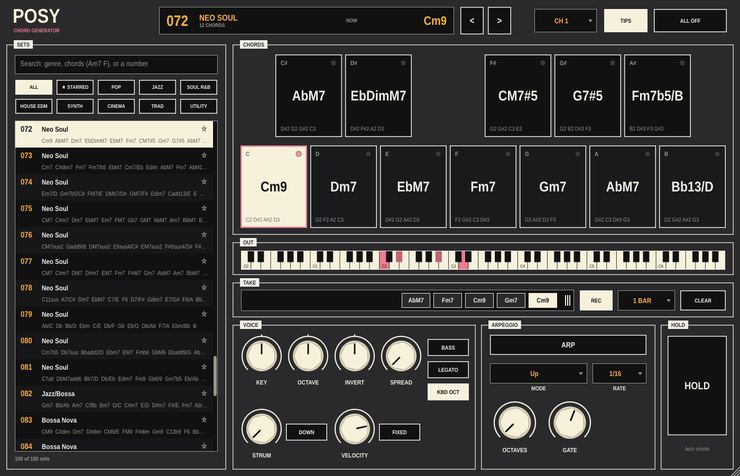
Posy plays one chord at a time out of a set of twelve, one per key of
the octave, and sends it on as MIDI: straight, strummed, held or
arpeggiated. Put any instrument after it and play pads, keys or plucks
with one finger. It makes no sound of its own.
What it does
- One hundred chord sets
- Pop, jazz, neo soul, gospel, house, synthwave, cinematic, classical
and more. Each set is a hand-voiced palette of twelve chords that belong
together.
- Search
- Type to filter. Words match genres (house, bossa),
chord names (Am7, F#m9, sus4) and set numbers.
Every word has to match, so Dm7 G7 jazz finds jazz sets with both
chords in them. Flats and sharps are the same thing. Star the sets you
keep coming back to.
- Twelve pads
- Laid out like an octave of a keyboard, sharps above. Click to play,
drag across to move between chords, play higher on a pad for more
velocity. A MIDI keyboard on Posy's track plays the same chords, and the
mod wheel, pitch bend and sustain pass straight through.
- Voicing
- Transpose by semitone or octave, rotate the inversion, spread the
voicing close, open or wide, double the bass an octave down, hold shared
notes across chord changes with LEGATO, and strum up to 200 ms in
either direction. Turn any of it while a chord is sounding and the chord
re-voices on the spot.
- Arpeggio and hold
- Eight arp modes including converge, random and a chord mode for
rhythmic stabs. Rates from 1/1 to 1/32 with triplets, one to four
octaves, adjustable gate. The arp locks to Live's grid while Live is
playing and free-runs at Live's tempo when it is stopped. HOLD latches
whatever is sounding so you can keep working.
- Drag into a clip
- The TAKE strip collects the chords you played, in order. Drag it onto
a clip slot in Live and it lands as a MIDI clip, one chord per half bar,
bar or two bars.
Every knob and button is a host parameter, the chord set included, so
set changes can be automated in an arrangement.
Video
Walkthrough video — not up yet.
Documentation
No PDF guide yet. The panel is documented in the
project README.
Download
Builds are on the
releases page.
VST3 only — there is no Audio Unit build, so Posy will not load in
Logic.
Installation notes are on the front page.
Source
github.com/taddeimania/posey
— C++ and JUCE, AGPLv3.