Plugins
Dicey
A stochastic melody and rhythm generator, built as a VST3 plugin for
any DAW that hosts them. Version 1.0.2.
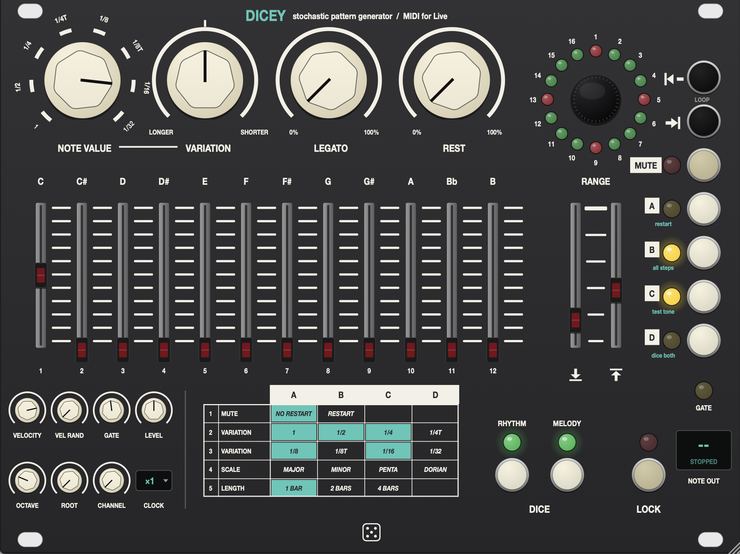
Dicey sends monophonic MIDI to whatever instrument you route it into,
and follows your DAW's transport and tempo. You do not write the line.
You set the odds — how likely each note value is, how likely each
semitone is, how often a step rests — and roll the dice until you
like what comes back.
What it does
- Rhythm
- NOTE VALUE sets the base rhythm from 1 to 1/32, triplets included.
VARIATION brings other values in at random — left for longer, right
for shorter, centre for off. LEGATO is the chance a note holds right up to
the next one; REST is the chance a step is silent.
- Melody
- Twelve faders, one per semitone, each setting how likely that note is.
The cap lights while its note is sounding. RANGE sets the lowest and
highest note across five octaves.
- Dice
- Click RHYTHM or MELODY for new dice, which means a new pattern. Hold
for realtime mode, where every pass through the loop gets fresh values.
Click again to go back to the dice you had. The dice save with the
project.
- Loop window
- A ring showing the pattern position. Set the first or last step, latch
both to slide the whole window, and commit on the next beat. Each step of
the ring is a sixteenth of the pattern, so in a four-bar pattern that is
one beat.
- Scales and lengths
- Scale presets set the faders for a scale on the chosen root, and you
are free to edit them afterwards. Pattern length is one, two or four
bars.
- Clock
- From ×2 to ÷32 against the DAW's tempo. At ÷4
everything runs four times slower — notes, loop and step ring —
and the pattern still stays lined up with the song.
- Extras
- LOCK keeps the current pattern playing while you move the controls, so
nothing changes until you let go. MUTE keeps it running silently. There is
a built-in test tone so you can hear it before you have routed anything,
and velocity, randomisation, gate, octave, root and MIDI channel controls.
Every control can be automated or MIDI-mapped from the host. Realtime
mode is deterministic for a given song position, so bouncing the same
section twice gives you the same notes.
Video
Walkthrough video — not up yet.
Documentation
- The rhythm knobs (PDF)
— what NOTE VALUE, VARIATION, LEGATO and REST do to each other.
Download
Builds for macOS, Windows and Linux are on the
releases page.
Dicey is a VST3 instrument that outputs MIDI, so your DAW needs
to be able to route an instrument's MIDI output to another track. Live,
Bitwig, REAPER and Cubase all can. Logic, GarageBand and Pro Tools do not
load VST3 at all.
In Live: drop Dicey on a MIDI track, put your synth on a second MIDI
track, set that track's MIDI From to the Dicey track and its
Monitor to In, then switch Dicey's test tone off with button
C. Installation notes are on the front
page.
Source
github.com/taddeimania/dicer
— C++ and JUCE, AGPLv3.